

Imagine having a streamlined way to understand your customers’ interactions with your business via phone calls. In the competitive business world, having a grasp on customer behavior is a key asset.
While call tracking is not seen by your customers, its impact on your business strategy is significant. This technology, especially in 2024, is a powerful tool for small businesses to gain valuable insights.
Call tracking, in essence, is about understanding the customer journey through their phone interactions with your business. At Local Splash, our approach simplifies this process by assigning a single unique phone number, making it easier for you to identify how customers are finding and contacting you. This method is particularly effective for small businesses, as it provides clear, actionable data without the complexity of managing multiple numbers.
The information gleaned from call tracking is crucial for making well-informed business decisions. By analyzing call patterns and customer inquiries, you can gain insights into what your customers are looking for, their concerns, and their expectations.
This data is invaluable for small business owners, as it can inform decisions like service improvements, operational changes, or even new product or service offerings. The insights provided by call tracking can be a game-changer for your revenue and business growth.
Google’s Policy on Call Tracking
Google allows the inclusion of call tracking numbers in Google Business Profiles, aligning with their guidelines for maintaining data integrity. Core aspects of Google’s policy include:
- Primary and Secondary Numbers: Businesses can add a call tracking number as the primary phone number on their Google Business Profile. However, we recommend listing the regular business number as an additional or secondary number. This practice ensures that your business number remains visible across various online citations.
- Consistency Across Citations: Maintaining consistent phone information across online platforms is crucial. Google’s policy emphasizes the integrity of local citations, which can be jeopardized by discrepancies in phone numbers across different online presences.
- Use in Conjunction with Google Tools: Call tracking is compatible with tools like Google Ads and Google Analytics. Using unique phone numbers linked to specific campaigns helps inform customer behavior without compromising data accuracy.
- Dynamic Number Insertion (DNI): DNI is a method that aligns with Google’s policy, displaying unique numbers each time an ad is triggered. This approach aids in keeping data consistent, which is crucial for adhering to Google’s guidelines.
It’s important to note that a standard practice employed by Local Splash for all its clients is to list the regular business number as a secondary contact. This approach is Google-compliant, and ensures that your business number remains visible across various online citations, maintaining consistency and integrity in your digital presence.
How Does Call Tracking Affect My SEO?
 For businesses focused on optimizing their online presence, comprehending the impact of call tracking on Search Engine Optimization (SEO) is vital. This section examines how including call tracking numbers in your digital marketing efforts can influence your SEO strategy:
- Impact on Local SEO: Implementing a call tracking number on your Google Business Profile can be done without harming your local citation profile or search rankings. This aligns with SEO best practices.
- Tracking and Advertising Effectiveness: Call tracking plays a significant role in PPC and SEO by providing insights into customer interactions. It helps to track the effectiveness of advertising efforts, contributing to a more nuanced understanding of SEO strategies.
- Technological Evolution: Modern technology and services in call tracking have evolved to offer effective tracking solutions. These advancements ensure the correct call-tracking implementation won’t negatively impact your SEO efforts.
- Consistency and Compliance: It’s vital to regularly update your call tracking numbers across all platforms to maintain consistency. This practice helps harmonize your call tracking with Google’s recommended methodologies, supporting SEO effectiveness.
- Adherence to Best Practices: Using call tracking responsibly and in accordance with Google’s guidelines is essential. This ensures that the SEO value of your Google My Business listing is maintained, contributing positively to your overall SEO strategy.
Benefits
Call tracking offers you comprehensive insights into your marketing effectiveness and customer interactions. By utilizing call tracking software, you can enhance your lead generation and sales pipeline, ensuring your marketing strategies yield a strong return on investment (ROI) and bolster productivity.
The following are key benefits of utilizing call tracking:
Record of Leads
You create valuable data collection when you capture every phone call as a potential lead within your Local Splash Dashboard. This enables you to track the origin of leads, assess the quality, and tailor your approach to increase conversions.
Review Voice Call Recordings
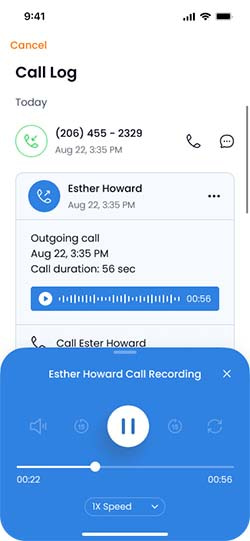
Having access to recordings of customer calls is an invaluable resource, particularly for home service-based businesses. These recordings are not just tools for training; they serve as a practical means to ensure accuracy in customer interactions.
For example, listening back to these calls allows your team to confirm critical details like the address provided for a service call, appointment times, and specific customer requests. This step is crucial for avoiding misunderstandings and ensuring that your team arrives at the correct location with the right tools and information.
By reviewing these calls, you not only enhance the quality of your service but also build a reputation for reliability and attention to detail.
Mark Disposition Records for Follow-Up
By marking disposition records in your system, you ensure timely and pertinent follow-ups. This process helps categorize the purpose and outcome of calls, making prioritizing and managing your sales pipeline easier.
Reduce Bots and Telemarketers
Modern call-tracking software can help filter out unwanted calls from bots and telemarketers. This purification of your call data enhances your team’s efficiency, allowing you to focus on calls that genuinely contribute to your business’s productivity.
Drawbacks
In 2024, you may encounter various challenges when using call tracking in your marketing strategy. Understanding and overcoming these challenges is crucial to maximizing the benefits of this technology.
Privacy and Compliance: One of your foremost concerns is ensuring privacy compliance. As online privacy regulations tighten, safeguarding customer data in call tracking becomes more complex. You must navigate these laws carefully to protect customer privacy and business interests.
Technology Integration: Integrating your call-tracking solution with existing CRM systems and analytics tools can sometimes create headaches. Choosing call-tracking solutions that offer smooth compatibility with your tech stack is essential to maintain efficiency.
Analytics and Reporting: For call tracking to be effective, it needs to provide clear insights into call sources and customer behavior. Extracting actionable data can prove difficult without advanced analytics tools. Automation may save time, but they can misinterpret nuances in phone calls that lead to less personalized customer experiences. Choosing a call-tracking solution that will scale as your business grows is essential to avoid increased costs and disruptions if you need to upgrade or switch platforms.
To navigate these challenges, you should place a strong emphasis on research and continuously keep abreast of evolving call-tracking technology and regulations. A better alternative is to adopt a managed solution by LocalSplash; this simplifies your commitment and allows you to maintain compliance while offering a high level of service to your customers.
How to Get a Call Tracking Number
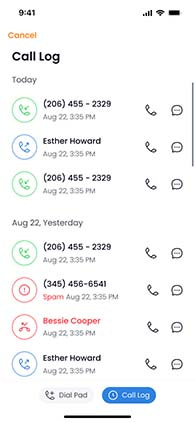
It’s fairly easy to buy a call tracking number; they are readily available online. Choosing the right call tracking service can make the difference in your marketing strategy. It’s tempting to go for a budget-friendly option, but consider factors like compliance with FCC regulations, specifically the STIR/SHAKEN standards designed to reduce spam and fraud in VoIP calls.
Non-adherence to these standards could lead to restrictions on your ability to make or receive calls. A poor reputation of the service provider can lead to a decrease in answer rate.
With larger services that cater to a broad audience, there’s a risk of encountering unreliable elements, which can affect service quality.
Once you’ve chosen a reliable call tracking provider, you’ll typically be offered access to a comprehensive dashboard. While this tool tracks calls, it provides key metrics for your marketing efforts, allowing you to see how your team is responding to inquiries and closing leads. .
A typical call tracking dashboard presents an integrated insight into your marketing channels, from phone calls and SMS to website interactions and advertising campaigns. This unified approach enables a deeper understanding of customer engagement across various platforms.
Key features include detailed records of call dates, times, and durations, providing valuable insights into customer conversations. Such data helps in refining marketing strategies and improving customer service. More advanced services (like those from Local Splash) offer mobile applications with softphone capabilities, further enhancing communication flexibility. Call tracking is included for our clients at no additional cost, as part of their service package.
Conclusion
In summary, call tracking in 2024 is vital for small businesses aiming to refine their marketing strategies and enhance customer engagement. By effectively addressing the potential drawbacks and leveraging the numerous benefits, companies can significantly elevate their marketing intelligence and customer service.
As we navigate the ever-evolving landscape of digital marketing and customer relations, adopting and optimizing call-tracking technologies will be instrumental in driving sales and fostering a deeper understanding of customer interactions.
At Local Splash, we are committed to providing tailored solutions that align with these principles, ensuring that our clients stay ahead in the dynamic word of digital marketing. By focusing on practical and effective call tracking strategies, we help small businesses thrive in a competitive market, enhancing their ability to connect with customers and understand their needs.